 Bearly Fit
Bearly Holding It Together
22nd Apr, 2026I built Bearly Fit with React Native 0.76.
Being relatively new to it at the time, that seemed like the sensible choice.
Unfortunately I took a long time to build it, and late last year Android decided to enforce 16KB page sizes.
Normally that would be fine - but React Native 0.76 was just on the cusp of the RN team enforcing the new architecture.
Meaning I can't just upgrade a few libraries and call it a day.
Nope - I need to upgrade everything!
This means I have until the end of May to:
- Upgrade to Expo 54
- Replace any third party libraries
- Upgrade my own code to React 19
- Implement CNG
With this in mind, and because I can't decide the direction I want to go with the Workout Plan UI...
This week I've been extracting the native modules into self contained libraries - complete with icons, example apps, documentation and a full test suite.
- BearlyAFileService
- BearlyASecretManager
- BearlyATimerService
- BearlyAZipService
- BearlyADatabaseService
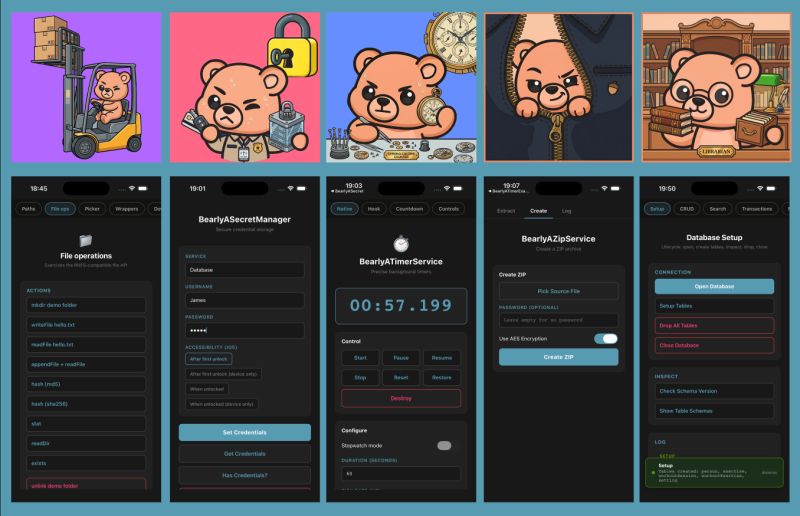
They're all compatible with my current app and the old architecture - but also built and tested against Expo 54 on the new architecture, using Turbo Modules.
I figured this would be a good way to test these large, core components in isolation and make sure they're ready for the migration.
I'm also going to start doing the same for the 3 main app sections - Exercise, Nutrition and Life. That'll let me not only isolate functionality a lot easier, but also build spin off specialist apps (for example aimed at personal trainers and people who exclusively do star jumps).
No real reason to share this, I just like attention.
Thanks for reading.
More like this

Testing Database Migrations
Aug 15, 2026How I test Bearly Fit's on-device database migrations - seeded databases, restoring previous backups and verifying them from a custom React Native debug menu.
Read moreFood Photos in the Log View
Aug 03, 2026Final touches to the Bearly Fit food UI - food images in the log view, an info button, and a richer barcode scanning screen with Nova, Nutriscore and Ecoscore grades.
Read moreSmarter Food Search
Jul 28, 2026Making it easier to find food in Bearly Fit's growing database with meal-period presets, smart defaults based on the time of day, and Most Recent and All Food filters.
Read more