 Bearly Fit
Testing Database Migrations
15th Aug, 2026Manual testing before a release of Bearly Fit drives me nuts. Not because I want to do it, but because I mostly have to.
Unlike a lot of apps, the database lives entirely on your device. There's no external server or anything to sync to. So every time I want to:
- add a new table
- new index
- update a column etc
I have to do those migrations on device and that comes with a lot risk. What if you're 3 versions behind? What if you don't have a backup? What if the migration fails?
Also because of O/S quirks I can't just test this in a sandbox, I need to run my tests on physical devices / simulators (so no Jest + SQL Library).
The first time I did this - I installed the previous release and then installed the new release on top, I tested the entire start to finish over and over again.
The second time - I created a mechanism to build a seeded V1 and V2 database and then from a custom debug menu deep inside the app I added a button to replace the database from the devices filesystem with a known copy and known values, then restart the app and go through the migration process.
This time, I decided to do something a little different. I modified metro so it copies the database + config for previous version to the bundle and then from a React Native debug menu I added 3 options:
- Restore a previous config + database
- Restore from a previous backup (v1/v2/v3)
- Verify a backup
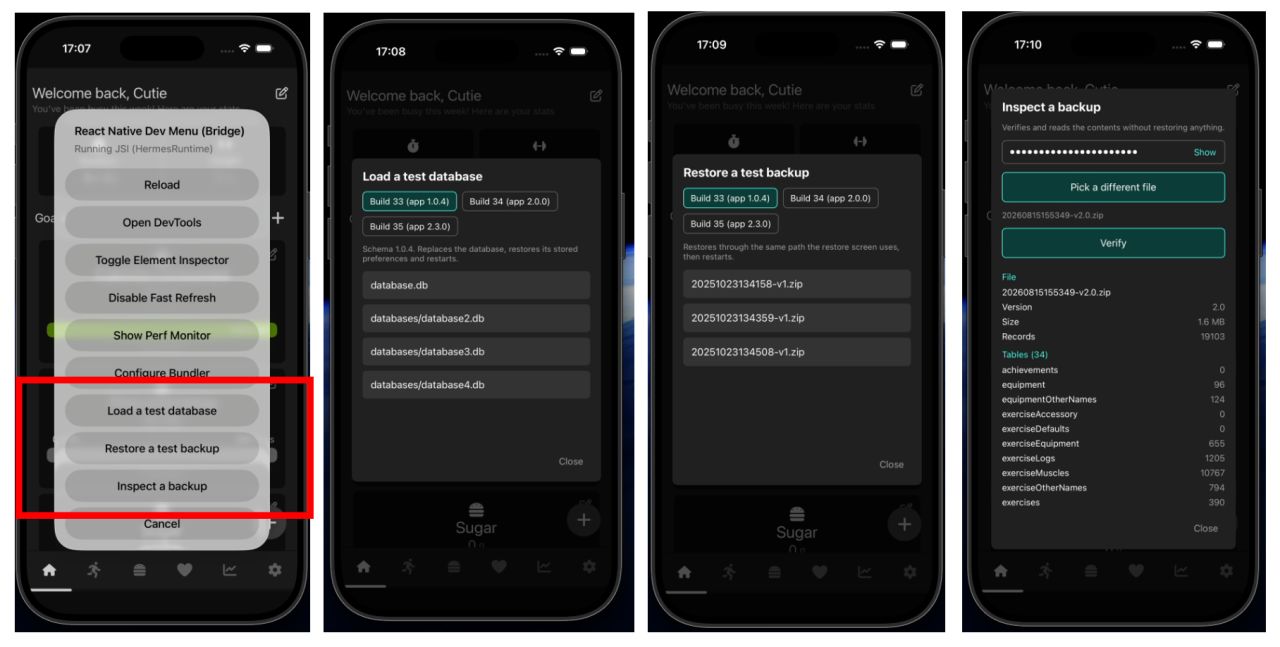
So now I can do 95% of testing very quickly without faffing about with reinstalls and the last 5% is mostly just belts and braces.
Eventually I want this to be a full E2E process, I had started building something like that, but it relies on a lot of hooks to give me confidence.
Thanks for reading! Going to do some more work on Bearly Fans now :)
More like this

Food Photos in the Log View
Aug 03, 2026Final touches to the Bearly Fit food UI - food images in the log view, an info button, and a richer barcode scanning screen with Nova, Nutriscore and Ecoscore grades.
Read moreSmarter Food Search
Jul 28, 2026Making it easier to find food in Bearly Fit's growing database with meal-period presets, smart defaults based on the time of day, and Most Recent and All Food filters.
Read moreRevamping the Exercise View
Jul 27, 2026Revamping the Bearly Fit Exercise View - removing the double menu, making core information prominent, naming targeted muscle groups and improving the guides.
Read more