 Bearly Fit
Working Some Magic
1st Apr, 2026Today I have mostly been improving the Wizard's UX.
Trying to build a much cleaner user experience. Still some work to go, but i'm overall happy with how the UI is coming along.
I'm not a designer, so it can be tough to get the right balance sometimes.
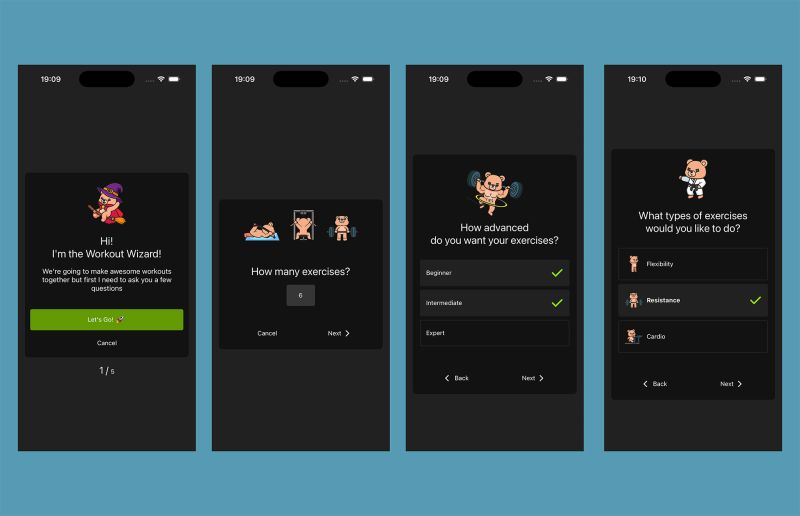
I've also spent a lot of time thinking about the code base.
Despite following good practices and separation of concerns, it's difficult to cover so much functionality without things getting a bit... well... massive. (I'll do a deep dive next week.)
So my next plan is to turn the core areas into self contained modules:
- Exercise
- Nutrition
- Health / Life
The hope is that this will make it easier to develop and also allow me to build spin offs - hyper specialist versions that only focus on one area.
It'll also let me experiment with features like AI that I don't want in the core experience.
Anyway, that's what I've been working on today.
Thanks for reading :)
More like this

Testing Database Migrations
Aug 15, 2026How I test Bearly Fit's on-device database migrations - seeded databases, restoring previous backups and verifying them from a custom React Native debug menu.
Read moreFood Photos in the Log View
Aug 03, 2026Final touches to the Bearly Fit food UI - food images in the log view, an info button, and a richer barcode scanning screen with Nova, Nutriscore and Ecoscore grades.
Read moreSmarter Food Search
Jul 28, 2026Making it easier to find food in Bearly Fit's growing database with meal-period presets, smart defaults based on the time of day, and Most Recent and All Food filters.
Read more